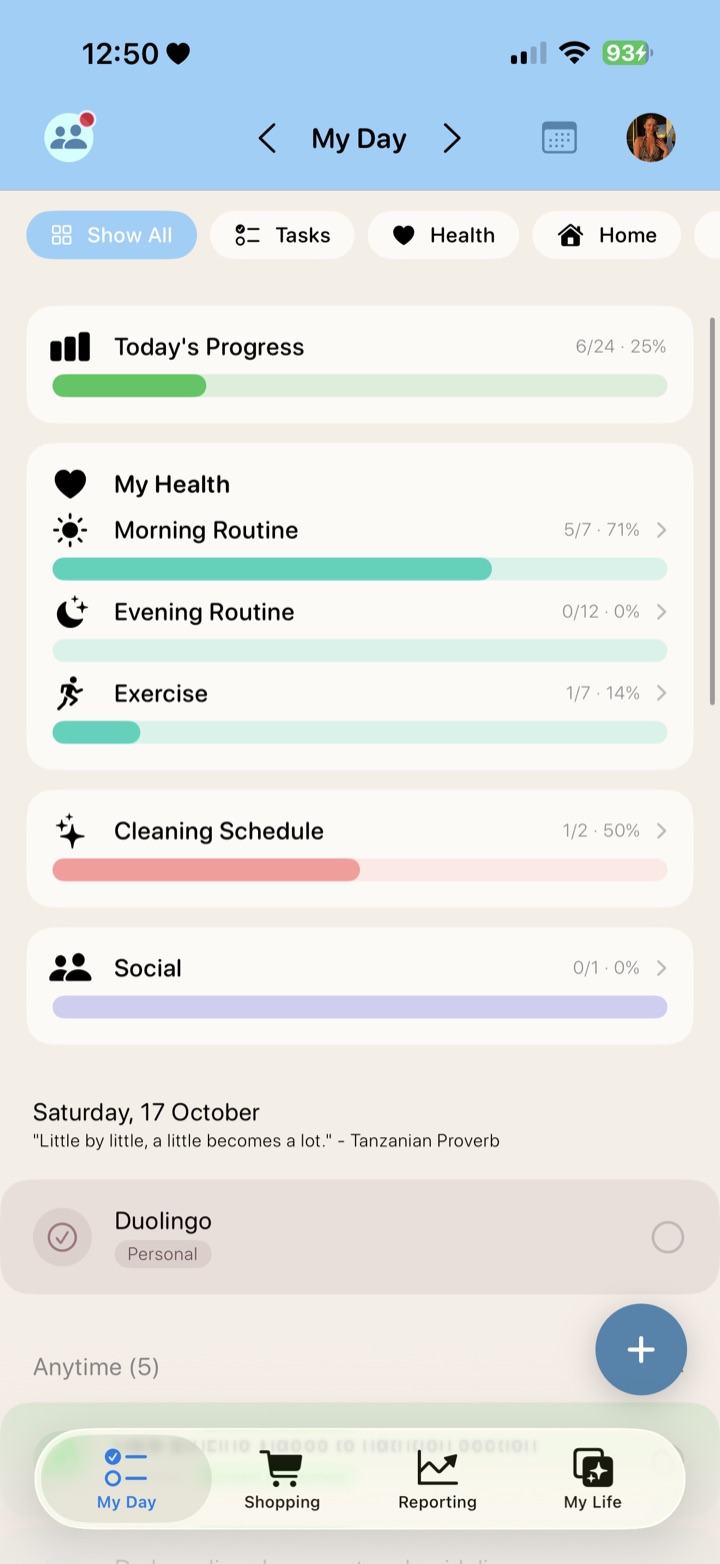
My Day
The heart of Lively. Open the app and see everything that needs you today, from every part of your life, in one focused view.
- Today's Progress: one bar showing how much of your day you've done, plus a progress bar for each routine and area, such as Morning Routine, Exercise, Cleaning Schedule and Social.
- Everything in one list: routines, tasks, reminders, calendar events and today's meals together, with quick filters for Tasks, Health, Home and more.
- Catch up on what you missed: overdue items are gathered in one place so you can tick them off, or mark them as missed in one tap and start fresh.
- Day analyser: see your productivity score and how your completions split across categories as the day goes on.
- Little moments of joy: a daily quote, streaks and a celebration when you finish.
Tasks and routines
Add anything, from a one off errand to a routine that repeats every day, every week or on whatever schedule suits you.
- Flexible repeat schedules, with reminders so nothing slips.
- Group steps into routines, such as a morning or evening routine.
- Colour coded categories with icons, and you can create your own.
- Streaks that show how consistent you've been.
Health and fitness
Everything that keeps you feeling your best, organised in one place.
- Morning and evening routines built around the things you actually do.
- Medication and supplements with reminders to take them, stock tracking, reminders to reorder before you run out and a link to where you buy them.
- A daily step goal that syncs automatically from Apple Health and Apple Watch.
- Workout plans by day, such as Leg Day on a Monday, or overall fitness goals.
Home
Keep your home running without carrying it all in your head.
- Cleaning schedules organised by room or by task.
- Repeating household jobs that reappear automatically when they're due.
- A progress bar on My Day showing how much of today's cleaning is done.
Shopping lists
A running shopping list that knows what's due to buy.
- Repeat items come back onto the list automatically, so staples never run out.
- Add quantities, and tick things off as you shop.
- Ingredients from your meal plan can go straight onto the list.
Meal planning and recipes
Plan the week's meals and shop for them in a couple of taps.
- Save your recipes with a photo, ingredients and a method or notes.
- Plan meals in any order across the week, or to a set schedule.
- Today's meals appear on My Day.
- Add a whole week's ingredients to your shopping list, and matching items are added together, so two recipes needing 2 chicken breasts become 4.
Finances
Know what's going out and when, without digging through emails.
- Bills and subscriptions with their amounts and due dates.
- See what's paid and what's still outstanding at a glance.
- A spending summary projected across today, this month and this year.
Social
Make space for the people who matter.
- Keep birthdays, important dates and details for the people in your life in one place.
- Reminders so a birthday or catch up never sneaks up on you.
- See who you've been in touch with, and who you haven't seen for a while.
Annual goals
Turn big goals into progress you can see.
- Set a goal for the year and break it into smaller steps.
- Link routines to a goal, so they count towards it automatically as you tick them off.
- Watch real progress build day by day.
Calendars
All your calendars, finally in one view.
- Connect Google, Microsoft Outlook and Apple calendars, as many as you like.
- Sort each calendar into the right area of your life, so events land in the right place.
- Day, week and month views, with your events next to your tasks and routines.
Reports
See where your time and effort really go.
- Weekly completions and a breakdown by category.
- A life balance view across health, home, finances, social and goals.
- Trends for your morning and evening routines, and what you've missed recently.
- Home, bills and annual goal summaries in one place.
Friends and motivation
A little friendly competition goes a long way.
- Add friends and earn points for what you complete.
- Climb the leaderboard and cheer each other on.
- A news feed of your friends' wins, if you choose to share them.
Make it yours
Use as much or as little of Lively as you want.
- Turn off the areas you don't need, such as meal planning, and they disappear from the app.
- Choose a colour scheme for each category, so you can see at a glance which part of your life everything belongs to.
- Create your own categories and choose how detailed your tracking gets.
- Your data is encrypted and never sold.